Sonosite PX RFID interference: probe, room, or version?
Same symptom on your system?
Tell us your model and what it is doing. A GEPROBE engineer replies with a diagnosis path, part options and pricing — usually within 6 hours, with no obligation.
Chat on WhatsApp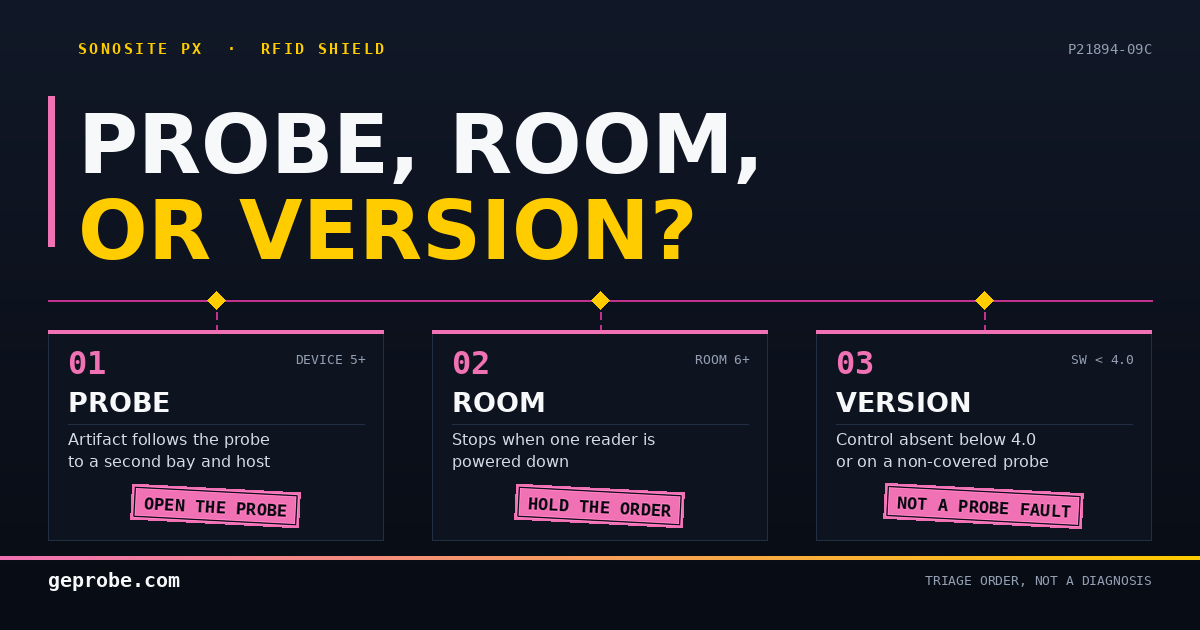
Sonosite PX RFID interference is usually filed as a repair question. It is really a purchasing question.
Bands in one bay, near a reader, can end in a probe order, a board order, or no order at all. The evidence that separates those three outcomes costs nothing to collect.
The three purchases this decision can end in
A banding complaint on a cart-based system resolves one of three ways, and they differ by orders of magnitude in cost. You replace the transducer, you replace a board in the host, or you change nothing on the machine and move the emitter.
Only one of those is a probe problem. Everything below is about proving which one you have before anything ships.
We take probe hardware work on the brands we publish. Software eligibility on a PX is not ours to rule on, and we do not pretend otherwise.
Three conditions that must all hold first
The control that suppresses this interference is printed as RFID Shield in the manufacturer's user guide. It is not present on every unit.
FUJIFILM SonoSite added it in software version 4.0, according to the updates table at the front of the guide (Table 2). A console on 3.x has no control to find, and no amount of probing will produce one.
Where it exists, the guide limits it to three transducer families. L12-3 gets it in every exam type except Lung and Ophthalmic. L13-6 gets it in every exam type. L15-4 gets it in every exam type (Table 24, p. 77).
Read the shape of that list rather than the three names. L19-5 is a supported PX transducer with Lung, Ophthalmic and Vascular Access in the exam table (Table 20, pp. 33–34).
It is absent from the control's coverage. So is every other probe in the catalogue.
The availability column marks the control for a live image and not for a frozen one. Freeze the frame and it disappears by design.
The five-minute check, before anyone quotes a probe
Four facts, all read off the machine itself. None of this needs a service call.
Open System settings, then System information, and record the software version. The guide points to the same page when it explains which manual revision matches your build (p. 65).
Record the exact transducer model and the exam preset that was selected. The preset is the difference between an eligible L12-3 and an excluded one.
Confirm the image is live in 2D. Then tap + More Controls, which sits along the lower edge of the panel, and scroll, because the control is not always in the centre block (p. 76).
Write down one of three outcomes: absent, present but greyed out, or present and tappable. Each leads somewhere different, and "absent" is the one most often escalated wrongly.
What the manual states, and what it leaves open
The guide gives two sentences of mechanism and stops. The control changes the transducer signal to prevent signal overlap, and the guide warns that this can affect imaging quality.
That is the whole manufacturer account. No emission source, no frequency band, no test method, no pass criterion.
Our own reading, offered as a hypothesis and not as a finding: the striping behaves like a beat between a reader's pulsed carrier and the line acquisition rate.
We have not measured it, and the guide does not support it. Do not put it in a service report as fact.
The image-quality warning is the operationally important half. A quieter picture is not automatically a better picture, and whether the trade is acceptable belongs to whoever owns image quality, not to whoever owns the parts budget.
One more thing worth knowing. The same control, with the same three-transducer limit and the same live-only behaviour, appears in the Sonosite ST user guide. This is a platform-level design boundary, not a quirk of one model.
Score it: does the noise follow the room or the device?
| Observation | Points to room | Points to device |
|---|---|---|
| Bands in bay A, clean in bay B, same probe and preset | 3 | 0 |
| Same bay, suspect probe bands, known-good probe clean | 0 | 3 |
| Bands on mains power, clean on battery | 2 | 0 |
| Bands track cart position inside one bay | 2 | 0 |
| Bands stop when one specific reader is powered down | 3 | 0 |
| Artifact follows the probe into a second bay and host | 0 | 4 |
| Artifact in one exam preset only, other presets clean | 0 | 1 |
| Artifact reproduces on a phantom in a quiet bay | 0 | 3 |
Read the two columns separately and do not average them.
Room six or more with device under two means you have a site problem: hold the purchase and give the finding to whoever owns the shared equipment.
Device five or more means open the probe case. Both columns high means the design was not controlled, so go back and re-run rather than interpreting.
One discipline before you score anything: identify the transmitter, not the label.
FDA separates RFID readers, which emit through antennas, from passive tags that only answer a reader, and from active tags that carry their own battery.
A tagged cabinet or an asset sticker is therefore not evidence of what was transmitting.
Record the reader, its location and the time. A tag sighting is a lead, not a finding.
That same EMC guidance lists RFID readers among common emitters that consensus standards do not cover well, which is why a room-level question rarely gets answered by manufacturer test data.
How many bench runs you need
A full factorial over k axes doubles with every axis you add, so write it out before you start:
N = R × P × H × 2
R is bays, P is probes counted as suspect plus known-good, H is hosts, and the ×2 is the filter off/on pair. Two bays, two probes, two hosts gives 2 × 2 × 2 × 2 = 16 runs.
The minimum discriminating design is far smaller. Hold the filter off and vary only room and probe: 2 × 2 = 4 runs. Changing two axes in the same run teaches you nothing, which is the whole reason the count is worth doing on paper.
Bench time is T = N × t. At ten minutes per run, four runs is forty minutes and sixteen runs is two hours forty.
The cost of getting this wrong is C = unit price + return freight + (days out of service × cases per day × contribution per case). We assert no prices here; substitute your own figures, because the ratio is what decides the question.
Acceptance checklist
- Software version recorded, and it is 4.0 or later
- Transducer and exam preset recorded, and the pairing is inside the guide's coverage
- Same probe runs on a phantom in a quiet bay, filter off
- Same probe runs on a second host, in a second bay
- A known-good probe of the same family runs in the first bay
- Filter state recorded for every run, never inferred afterwards
- Image-quality change recorded separately from band presence
- No erratic or inconsistent behaviour at any point in the session
If all eight hold and the artifact still follows the probe, you have a probe case. If any room or host row is missing, you have an unfinished investigation, not a diagnosis.
Four ways a room problem becomes a purchase order
A missing control read as a failure. On 3.x, or on an L19-5, or in Lung on an L12-3, the control is not supposed to be there at all.
An excluded exam read as a defect. Lung and Ophthalmic sit inside the L12-3 exam table and outside the control's coverage. That is a documented boundary, not a broken button.
A frozen image read as a fault. Availability drops out the moment the frame is frozen, and engineers who test on a frozen frame conclude the feature is gone.
Crosstalk read as probe damage. A second system transmitting nearby can register in your image. Record when it was scanning before you condemn a transducer for someone else's pulses.
Repair, replace, or hand it back
| Finding | Who owns it | Action |
|---|---|---|
| Clean on phantom in a quiet bay, clean on both hosts | Facilities and the RF owner | Close it; no order |
| Follows the probe to every bay and host | Probe hardware | Bench evaluation, if the brand is on our roster |
| Single vertical dropout or dead element on phantom | Probe array | Bench evaluation |
| Visible lens, cable or connector damage | Probe | Repair cable, lens or connector |
| Control absent on 4.0 or later, eligible setup | Manufacturer | Eligibility question, not hardware |
| Identical artifact on three known-good probes | Host or board path | Tested parts, where stocked |
| Erratic or inconsistent behaviour | Manufacturer | Stop clinical use first |
| Probe under a regulatory field action | Manufacturer | Do not repair |
Our work stops in three places. We do not certify clinical release, we do not modify system software, and we do not issue an eligibility ruling on a PX.
What this leaves on the purchase order
The cheapest run is the one that tells you not to order. Four bench runs and a recorded software version usually settle it.
If the probe is the cause and the brand is one we service, send it for evaluation. For board and transducer parts, see the parts catalogue.
Sources
- Sonosite PX User Guide, English, P21894-09C — reviewed 2026-11-24.
- Sonosite ST User Guide, English, P31244-04B — reviewed 2026-11-24.
- FDA, Radio Frequency Identification — reviewed 2026-11-24.
- FDA, EMC of Medical Devices guidance — reviewed 2026-11-24.
- GEPROBE repair services — reviewed 2026-11-24.
- GEPROBE ultrasound parts — reviewed 2026-11-24.
Table and page references above are to the P21894-09C edition; check the guide revision that matches the software actually installed on the unit in front of you.
Related Articles
Philips Lumify iOS cable: a bench order of operations
Which leads a Lumify iOS kit needs, how to prove the charging path on the bench, and how to grade a used Power Module before paying.
Clarius Handheld Ultrasound Extended Use: A Setup Audit
A fault-domain audit for Clarius handheld ultrasound extended use: measure the fan trigger, size the duty cycle, and verify the power chain.
Cross-Border Ultrasound Probe Repair: A Verification File
Which unit ships, what the round trip really costs, how to verify a returned probe with no spare, and who signs it back into clinical use.